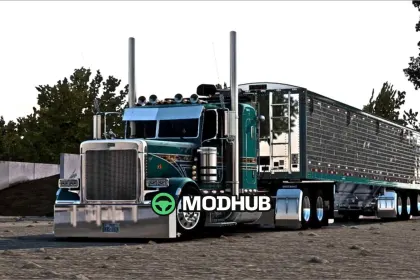
The «Truck Peterbilt 389 Custom Mexa» mod for American Truck Simulator brings a standout truck to the game with a clear personality and a Baja California vibe. It’s more than a simple model swap: the focus is on visual fidelity and customization options that help you create your own truck look.
The design highlights the character of the border region, while carefully rendered materials make the cabin and exterior elements feel believable in motion and at rest. You can enjoy trips with a more distinctive visual identity, whether you drive in daytime lighting or under the changing scenery on long hauls.
• Baja California inspired exterior styling for Peterbilt 389 Custom Mexa
• Realistic textures and well-detailed materials for cabin and parts
• Customization options to match different player preferences
• Built to fit naturally into American Truck Simulator gameplay
About Truck Peterbilt 389 Custom Mexa for American Truck Simulator
Truck Peterbilt 389 Custom Mexa for American Truck Simulator is a mod for American Truck Simulator. Check the author description, supported game version and dependencies before installing.
How to install the mod
Follow the installation instructions for Truck Peterbilt 389 Custom Mexa for American Truck Simulator, American Truck Simulator and your platform.
Download the mod archive using the Download button and read the author instructions.
Use the folder and archive format specified by the mod author for this game.
Start the game and enable the mod for the selected save or profile, if required.
Test using a backup or a new save. Install any dependencies listed by the author.
System requirements and compatibility
Check the mod description for supported game versions, required DLC and platforms. Compatibility with every version or other mods is not guaranteed.
Frequently asked questions
Is this mod free?
MODHUB does not charge for access to this mod page. Check the terms and download limits of the external file provider.
Can I use this mod in American Truck Simulator multiplayer?
Multiplayer support depends on the mod and its author. If supported, the server and players need matching mod versions and required DLC.
What should I check if the mod does not work?
Check the installation folder, archive structure, supported game version, dependencies and game logs. Test the mod separately using a backup save.
How can I check a downloaded mod?
Use trusted author sources, scan the archive and back up your saves. Do not run unrelated installers; a download listing does not guarantee safety or compatibility.