Traffic MX is a traffic mod for American Truck Simulator built for version 4.5 of the Reforma Map. It replaces the default American vehicle flow with Mexican traffic by configuring patrol cars separately for each state. Ambulances and fire trucks now carry Mexican paintwork, while US patrol cars and uncommon vehicles such as Teslas or RVs no longer appear in Mexico. The mod also supports ATS version 1.62.x.
• Patrol cars are configured per state, and the police Charger 3D model has been improved
• Typical Mexican vehicles added: Jetta, Beetle, Golf and Amarok
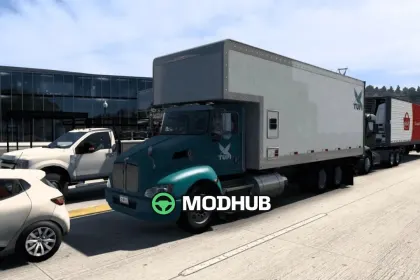
• Torton Freightliner M2 trucks: Pemex tanker, refrigerated, flatbed and dry van in multiple paint colors
• Kenworth T370 Torton dry van in 14 colors, Irizar i8 bus and 3 new vans
• Trailers: Mexican dry van and double trailer, plus police and a bus for the Nuevo León area
Overall, the mod makes road traffic across Mexico consistent and recognizable for players.
Author: Marco Mapper
About Traffic MX for Reforma Map v4.5 for ATS
Traffic MX for Reforma Map v4.5 for ATS is a mod for American Truck Simulator. Check the author description, supported game version and dependencies before installing.
How to install the mod
Follow the installation instructions for Traffic MX for Reforma Map v4.5 for ATS, American Truck Simulator and your platform.
Download the mod archive using the Download button and read the author instructions.
Use the folder and archive format specified by the mod author for this game.
Start the game and enable the mod for the selected save or profile, if required.
Test using a backup or a new save. Install any dependencies listed by the author.
System requirements and compatibility
Check the mod description for supported game versions, required DLC and platforms. Compatibility with every version or other mods is not guaranteed.
Frequently asked questions
Is this mod free?
MODHUB does not charge for access to this mod page. Check the terms and download limits of the external file provider.
Can I use this mod in American Truck Simulator multiplayer?
Multiplayer support depends on the mod and its author. If supported, the server and players need matching mod versions and required DLC.
What should I check if the mod does not work?
Check the installation folder, archive structure, supported game version, dependencies and game logs. Test the mod separately using a backup save.
How can I check a downloaded mod?
Use trusted author sources, scan the archive and back up your saves. Do not run unrelated installers; a download listing does not guarantee safety or compatibility.