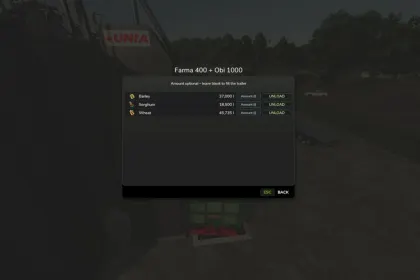
Smart Storage Hub is a script for Farming Simulator 25 that improves how you manage grain silos, pallet storage and bale storage. The modern, easy-to-read interface shows your stored goods and helps you decide what to retrieve and how much. It tracks inventory across silos, pallet buildings and bale storage, so you always know what is available. The game's core mechanics remain unchanged, as the script only enhances the existing storage functions.
• All available crops are listed with their current storage quantities and matching icons.
• Enter an exact amount in litres, or leave the field blank to fill your trailer as usual.
• A live display shows stored quantities or remaining silo capacity during loading and unloading, with colour-coded values.
• Choose how many pallets or bales to retrieve per operation, with up to 25 objects at once.
• Inventory quantities refresh automatically while the selection menu stays open.
• Open the storage interface directly from the driver's seat of a suitable transport vehicle, without leaving it.
Retrieved objects continue to appear at the storage building's designated output area, and buying stations and unlimited fill sources keep their usual behaviour.
Author: EliMods
About Storage Management Script Smart Storage Hub for Farming Simulator 25
Storage Management Script Smart Storage Hub for Farming Simulator 25 is a mod for Farming Simulator 25. Check the author description, supported game version and dependencies before installing.
How to install the mod
Follow the installation instructions for Storage Management Script Smart Storage Hub for Farming Simulator 25, Farming Simulator 25 and your platform.
Download the mod archive using the Download button and read the author instructions.
On PC, copy the mod ZIP without extracting it to Documents/My Games/FarmingSimulator2025/mods. For a bundle, extract the individual mod ZIPs first. macOS and Microsoft Store paths may differ; check Mod Directory in the game log.txt.
Start the game and enable the mod for the selected save or profile, if required.
Test using a backup or a new save. Install any dependencies listed by the author.
System requirements and compatibility
Check the mod description for supported game versions, required DLC and platforms. Compatibility with every version or other mods is not guaranteed. Farming Simulator script mods are for PC/macOS. Console players can only install compatible mods from the in-game GIANTS ModHub.
Frequently asked questions
Is this mod free?
MODHUB does not charge for access to this mod page. Check the terms and download limits of the external file provider.
Can I use this mod in Farming Simulator 25 multiplayer?
Multiplayer support depends on the mod and its author. If supported, the server and players need matching mod versions and required DLC.
What should I check if the mod does not work?
Check the installation folder, archive structure, supported game version, dependencies and game logs. Test the mod separately using a backup save.
How can I check a downloaded mod?
Use trusted author sources, scan the archive and back up your saves. Do not run unrelated installers; a download listing does not guarantee safety or compatibility.