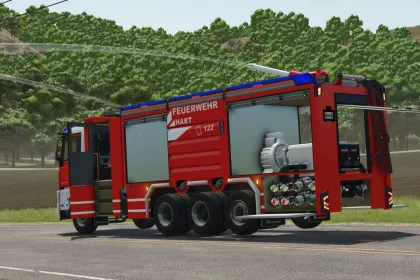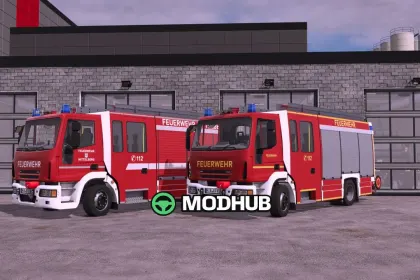
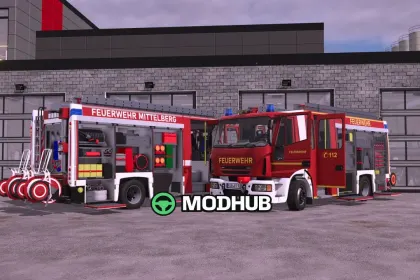
The Lizard HLF 20 is a modern rescue fire engine built for use in Farming Simulator 25. It combines firefighting and technical rescue capabilities and features a large water tank as well as extensive equipment for a wide range of scenarios. Thanks to its power and speed, the vehicle is well suited to reach the scene quickly and handle various tasks. The HLF 20 is ideal for players who value realistic fire service vehicles and detailed roleplay.
• Power of 320 hp and a top speed of 110 kph
• Water tank with a capacity of 1600 litres
• Animated speedometer, doors, roller shutters and steps
• Detailed interior, rear view camera (Mercedes DLC only) and trailer hitch
• Blue lights, light mast via the "X" button and a mounting point for hose reels
• Functional individually removable nozzle and functional winch
• Full Emergency Pack support: start and edit missions, horn and tail warning
• Configurations for reflector color, main color, rim color, roller shutter color and design
Version V1.1.0.1 adds compatibility with Emergency Pack v1.3.0, so the water tank is now recognized correctly.
About Fire Truck Lizard HLF 20 for FS25
Fire Truck Lizard HLF 20 for FS25 is a mod for Farming Simulator 25. Check the author description, supported game version and dependencies before installing.
How to install the mod
Follow the installation instructions for Fire Truck Lizard HLF 20 for FS25, Farming Simulator 25 and your platform.
Download the mod archive using the Download button and read the author instructions.
On PC, copy the mod ZIP without extracting it to Documents/My Games/FarmingSimulator2025/mods. For a bundle, extract the individual mod ZIPs first. macOS and Microsoft Store paths may differ; check Mod Directory in the game log.txt.
Start the game and enable the mod for the selected save or profile, if required.
Test using a backup or a new save. Install any dependencies listed by the author.
System requirements and compatibility
Check the mod description for supported game versions, required DLC and platforms. Compatibility with every version or other mods is not guaranteed. Farming Simulator script mods are for PC/macOS. Console players can only install compatible mods from the in-game GIANTS ModHub.
Frequently asked questions
Is this mod free?
MODHUB does not charge for access to this mod page. Check the terms and download limits of the external file provider.
Can I use this mod in Farming Simulator 25 multiplayer?
Multiplayer support depends on the mod and its author. If supported, the server and players need matching mod versions and required DLC.
What should I check if the mod does not work?
Check the installation folder, archive structure, supported game version, dependencies and game logs. Test the mod separately using a backup save.
How can I check a downloaded mod?
Use trusted author sources, scan the archive and back up your saves. Do not run unrelated installers; a download listing does not guarantee safety or compatibility.