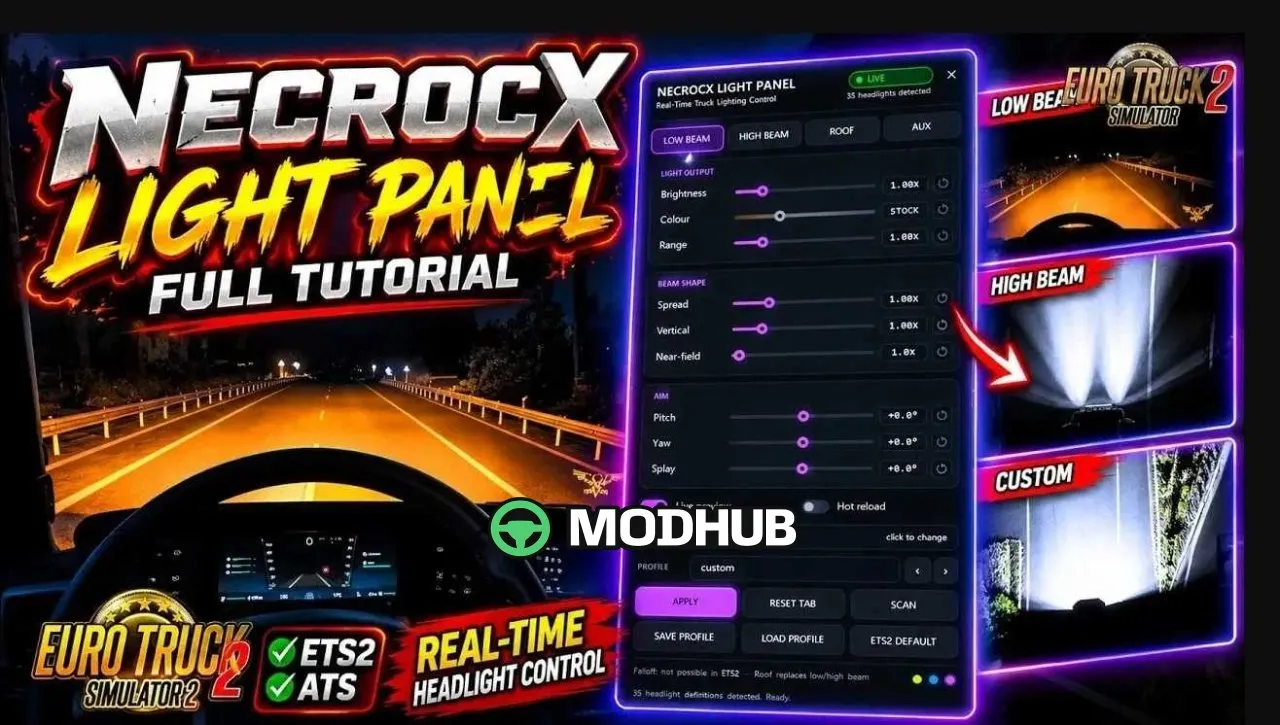
NecroCX Light Panel PlugIn v1.5 is a free in-game plugin for Euro Truck Simulator 2 that lets you tune your truck's real road lights while driving. Once installed, you open the panel with the Shift + Insert hotkey and see the result immediately on the road. Each light group — low beam, high beam, roof bar and front auxiliary lights — can be adjusted independently. Version 1.5 is fully compatible with headlight and lighting mods and brings improved ATS support.
• Nine controls per light group: brightness (0.05–5.00x), colour temperature (1700–12000 K), range, spread, vertical, near-field, pitch, yaw and splay
• Profiles system for saving and loading your own setups
• "My truck only" mode, especially useful in TruckersMP
• No DirectX overlay, so it stays compatible with ReShade, DLSS and similar tools
• Customizable hotkey and clearer status messages
Tested on game version 1.61.x, it is installed via Install.bat where you choose ETS2, ATS or both.
About NecroCX Light Panel PlugIn v1.5 (1.61.x) for ETS2
NecroCX Light Panel PlugIn v1.5 (1.61.x) for ETS2 is a mod for Euro Truck Simulator 2. Check the author description, supported game version and dependencies before installing.
How to install the mod
Follow the installation instructions for NecroCX Light Panel PlugIn v1.5 (1.61.x) for ETS2, Euro Truck Simulator 2 and your platform.
Download the mod archive using the Download button and read the author instructions.
Use the folder and archive format specified by the mod author for this game.
Start the game and enable the mod for the selected save or profile, if required.
Test using a backup or a new save. Install any dependencies listed by the author.
System requirements and compatibility
Check the mod description for supported game versions, required DLC and platforms. Compatibility with every version or other mods is not guaranteed.
Frequently asked questions
Is this mod free?
MODHUB does not charge for access to this mod page. Check the terms and download limits of the external file provider.
Can I use this mod in Euro Truck Simulator 2 multiplayer?
Multiplayer support depends on the mod and its author. If supported, the server and players need matching mod versions and required DLC.
What should I check if the mod does not work?
Check the installation folder, archive structure, supported game version, dependencies and game logs. Test the mod separately using a backup save.
How can I check a downloaded mod?
Use trusted author sources, scan the archive and back up your saves. Do not run unrelated installers; a download listing does not guarantee safety or compatibility.