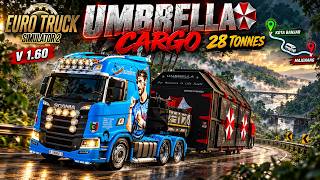
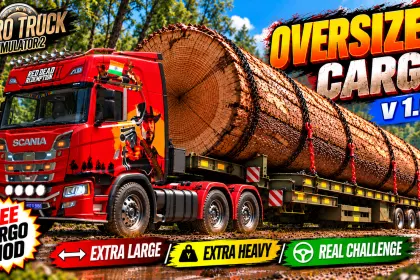
Ever wondered how challenging an unusual oversized load can be on narrow roads and steep slopes? Take on this distinctive Umbrella Cargo in Euro Truck Simulator 2, featuring an eye-catching black-and-red design and an exceptionally awkward shape that makes every turn, climb and tight manoeuvre a real test of driving skill!
The Umbrella Cargo job appears in the Freight Market after the mod is activated in the Mod Manager. Take on this extra-large load, navigate challenging routes and put your driving and steering skills to the test!
Updated to adapt to the latest ETS2 v. 1.61.
Tested on ETS2 v. 1.46 to v. 1.61.
File size: 23.2 MB
Installation Instructions
1. Copy the `.scs` mod file to the following folder:
Replace `YourUsername` with your actual Windows username.
2. Launch Euro Truck Simulator 2 and activate the mod in the Mod Manager.
3. Open the Freight Market and look for the available Umbrella Cargo job.
4. Depending on your system configuration, you may need to rest 2–4 times in the game before the Umbrella Cargo appears in the Jobs → Freight Market list.
Warning
Uploading, re-uploading, republishing or redistributing this mod or its files on other websites or platforms without prior permission from the creator is prohibited and may result in legal action.
Sharing is permitted only through the creator's original download links. Do not host or distribute copies of the mod files.
YouTube Channel
Subscribe for updates, unique cargo mods and more free mods:
https://www.youtube.com/@CryptorGen2
Enjoy the challenge!
Thank you,
CryptorGen2
Credits
Credits CryptorGen2, Gabbar302
About Oversized Umbrella Cargo for ETS2 v. 1.61
Oversized Umbrella Cargo for ETS2 v. 1.61 is a mod for Euro Truck Simulator 2. Check the author description, supported game version and dependencies before installing.
How to install the mod
Follow the installation instructions for Oversized Umbrella Cargo for ETS2 v. 1.61, Euro Truck Simulator 2 and your platform.
Download the mod archive using the Download button and read the author instructions.
Use the folder and archive format specified by the mod author for this game.
Start the game and enable the mod for the selected save or profile, if required.
Test using a backup or a new save. Install any dependencies listed by the author.
System requirements and compatibility
Check the mod description for supported game versions, required DLC and platforms. Compatibility with every version or other mods is not guaranteed.
Frequently asked questions
Is this mod free?
MODHUB does not charge for access to this mod page. Check the terms and download limits of the external file provider.
Can I use this mod in Euro Truck Simulator 2 multiplayer?
Multiplayer support depends on the mod and its author. If supported, the server and players need matching mod versions and required DLC.
What should I check if the mod does not work?
Check the installation folder, archive structure, supported game version, dependencies and game logs. Test the mod separately using a backup save.
How can I check a downloaded mod?
Use trusted author sources, scan the archive and back up your saves. Do not run unrelated installers; a download listing does not guarantee safety or compatibility.