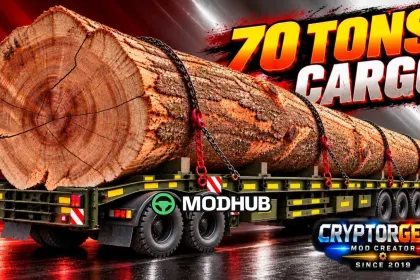
This mod adds an oversized cargo to Euro Truck Simulator 2: a massive 70-tonne baobab trunk said to be 400 years old. The load is made for players who enjoy extreme weight and challenging heavy transport jobs. Once activated in the Mod Manager, the job appears in the Freight Market. The mod was tested on ETS2 version 1.61 and is compatible with versions from 1.46 to 1.61.
• Total cargo weight of 70 tonnes, one of the heaviest loads in the game
• The trunk's dimensions far exceed standard trailers, so a wide corridor is required
• The wood is around 400 years old, giving the cargo a unique appearance
• The mod file is 2.23 MB and installs by copying it into the mod folder
• The job appears in the Freight Market after the mod is activated
Depending on your system, you may need to rest 2–4 times in the game before the baobab cargo shows up in the Jobs → Freight Market list.
Author: CryptorGen2 Gabbar302
About 70 Tonnes Oversized Cargo Baobab Trunk for ETS2
70 Tonnes Oversized Cargo Baobab Trunk for ETS2 is a mod for Euro Truck Simulator 2. Check the author description, supported game version and dependencies before installing.
How to install the mod
Follow the installation instructions for 70 Tonnes Oversized Cargo Baobab Trunk for ETS2, Euro Truck Simulator 2 and your platform.
Download the mod archive using the Download button and read the author instructions.
Use the folder and archive format specified by the mod author for this game.
Start the game and enable the mod for the selected save or profile, if required.
Test using a backup or a new save. Install any dependencies listed by the author.
System requirements and compatibility
Check the mod description for supported game versions, required DLC and platforms. Compatibility with every version or other mods is not guaranteed.
Frequently asked questions
Is this mod free?
MODHUB does not charge for access to this mod page. Check the terms and download limits of the external file provider.
Can I use this mod in Euro Truck Simulator 2 multiplayer?
Multiplayer support depends on the mod and its author. If supported, the server and players need matching mod versions and required DLC.
What should I check if the mod does not work?
Check the installation folder, archive structure, supported game version, dependencies and game logs. Test the mod separately using a backup save.
How can I check a downloaded mod?
Use trusted author sources, scan the archive and back up your saves. Do not run unrelated installers; a download listing does not guarantee safety or compatibility.