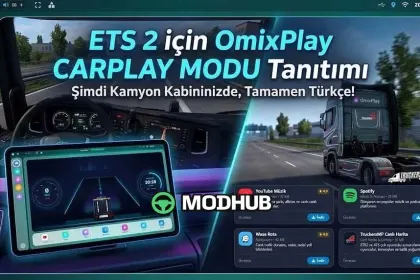
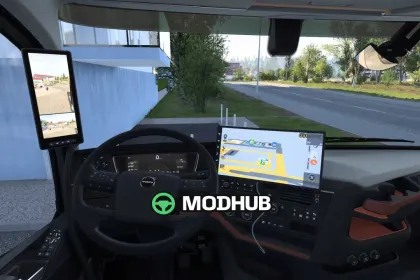
The OmixPlay UI Carplay multimedia system mod is made for Euro Truck Simulator 2 and upgrades your in-cab dashboard into a modern information center. It focuses on comfortable control of entertainment and at-a-glance truck status, so every trip feels more connected. The interface also includes elements that resemble practical navigation and lane-awareness workflows.
• Live Telemetry: digital speedometer, RPM gauge, gear indicators, and lane-assist simulation
• CarPlay-style UI: quick access to key functions from the cabin display
• Media services: Spotify, YouTube Music, Fizy, Yandex Music, plus web radio
• Smart navigation: Waze and TomTom integration for route assistance
• Multiplayer/live mapping: TruckersMP Live Map for real-time traffic and convoy tracking
Beyond the core telemetry and media, OmixPlay UI Carplay offers visual customization. Choose multiple UI color themes and switch between Day/Night modes for a more readable setup in both bright and dark conditions. This is a solid ETS2 enhancement for players who want better cockpit information and fast access to music and navigation tools while driving.
About OmixPlay UI Carplay multimedia system for ETS2
OmixPlay UI Carplay multimedia system for ETS2 is a mod for Euro Truck Simulator 2. Check the author description, supported game version and dependencies before installing.
How to install the mod
Follow the installation instructions for OmixPlay UI Carplay multimedia system for ETS2, Euro Truck Simulator 2 and your platform.
Download the mod archive using the Download button and read the author instructions.
Use the folder and archive format specified by the mod author for this game.
Start the game and enable the mod for the selected save or profile, if required.
Test using a backup or a new save. Install any dependencies listed by the author.
System requirements and compatibility
Check the mod description for supported game versions, required DLC and platforms. Compatibility with every version or other mods is not guaranteed.
Frequently asked questions
Is this mod free?
MODHUB does not charge for access to this mod page. Check the terms and download limits of the external file provider.
Can I use this mod in Euro Truck Simulator 2 multiplayer?
Multiplayer support depends on the mod and its author. If supported, the server and players need matching mod versions and required DLC.
What should I check if the mod does not work?
Check the installation folder, archive structure, supported game version, dependencies and game logs. Test the mod separately using a backup save.
How can I check a downloaded mod?
Use trusted author sources, scan the archive and back up your saves. Do not run unrelated installers; a download listing does not guarantee safety or compatibility.