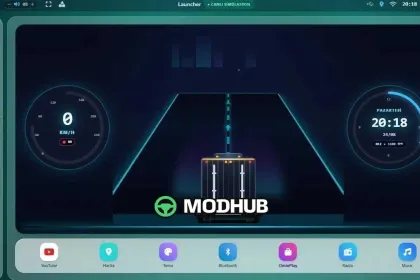
The OmixPlay UI mod is built for Euro Truck Simulator 2 and brings a CarPlay-style infotainment experience to your truck cab. In ETS2 v1.0, the dashboard becomes a practical control center with live vehicle telemetry and media-style navigation conveniences.
• Version: v1.0 for Euro Truck Simulator 2 (ETS2)
• Live telemetry readouts: speed, RPM, and gear
• Lane-assist simulation indicators shown on the dashboard UI
• Quick media access to YouTube, Spotify, and supported music/web-radios
• Smart navigation utilities with map/live features and traffic/route awareness
With this interface, key information stays visible while driving, so you spend less time checking separate HUD elements. The RPM/gear display is designed to be easy to read, and the lane-assist visuals provide extra guidance during lane changes and highway cruising.
Customization options let you match the theme to the environment: multiple color schemes and a Day/Night switch are included. The OmixPlay UI focuses on smooth dashboard integration for long routes where clarity, fast control, and real-time updates matter.
About OmixPlay UI Interface for ETS2
OmixPlay UI Interface for ETS2 is a mod for Euro Truck Simulator 2. Check the author description, supported game version and dependencies before installing.
How to install the mod
Follow the installation instructions for OmixPlay UI Interface for ETS2, Euro Truck Simulator 2 and your platform.
Download the mod archive using the Download button and read the author instructions.
Use the folder and archive format specified by the mod author for this game.
Start the game and enable the mod for the selected save or profile, if required.
Test using a backup or a new save. Install any dependencies listed by the author.
System requirements and compatibility
Check the mod description for supported game versions, required DLC and platforms. Compatibility with every version or other mods is not guaranteed.
Frequently asked questions
Is this mod free?
MODHUB does not charge for access to this mod page. Check the terms and download limits of the external file provider.
Can I use this mod in Euro Truck Simulator 2 multiplayer?
Multiplayer support depends on the mod and its author. If supported, the server and players need matching mod versions and required DLC.
What should I check if the mod does not work?
Check the installation folder, archive structure, supported game version, dependencies and game logs. Test the mod separately using a backup save.
How can I check a downloaded mod?
Use trusted author sources, scan the archive and back up your saves. Do not run unrelated installers; a download listing does not guarantee safety or compatibility.