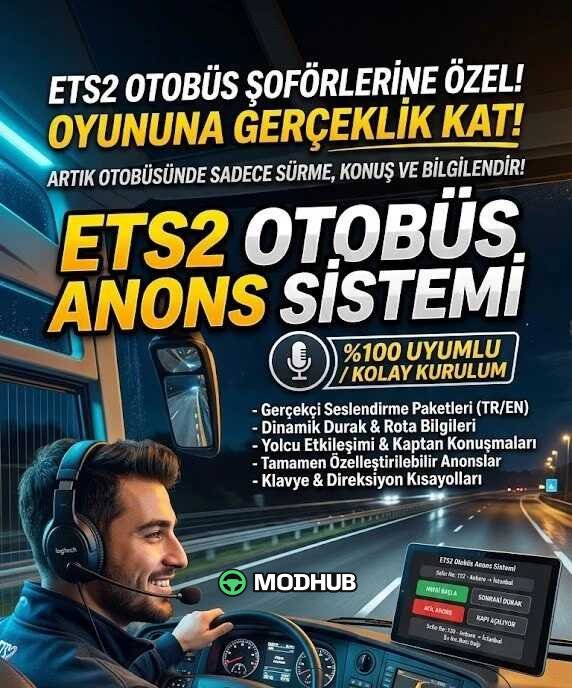
Voice Announcement v1.0 is a mod for Euro Truck Simulator 2 that brings realistic voice announcements to your trips through cities and terminals. Instead of replacing trucks or maps, it enhances immersion with timed audio cues that fit trucking routines in ETS2.
• Automatic triggers: plays announcements when entering or leaving cities and when reaching terminals
• Sound packs: pre-made audio sets tailored to bus lines and logistics-style scenarios
• Hotkey support: trigger any announcement manually using in-game shortcut keys
• Fully customizable: add your own voice lines (.mp3/.wav) and create text soundboard entries
The tool uses a lightweight, modern UI with a dark mode look and is designed to avoid FPS drops. You can keep the included packs for a quick setup or build your own schedule of announcements to match your virtual company, routes, or passenger-transport roleplay. The result is a more lively driving experience where stations and city changes feel more “alive.”
About Voice Announcement v1.0 for ETS2
Voice Announcement v1.0 for ETS2 is a mod for Euro Truck Simulator 2. Check the author description, supported game version and dependencies before installing.
How to install the mod
Follow the installation instructions for Voice Announcement v1.0 for ETS2, Euro Truck Simulator 2 and your platform.
Download the mod archive using the Download button and read the author instructions.
Use the folder and archive format specified by the mod author for this game.
Start the game and enable the mod for the selected save or profile, if required.
Test using a backup or a new save. Install any dependencies listed by the author.
System requirements and compatibility
Check the mod description for supported game versions, required DLC and platforms. Compatibility with every version or other mods is not guaranteed.
Frequently asked questions
Is this mod free?
MODHUB does not charge for access to this mod page. Check the terms and download limits of the external file provider.
Can I use this mod in Euro Truck Simulator 2 multiplayer?
Multiplayer support depends on the mod and its author. If supported, the server and players need matching mod versions and required DLC.
What should I check if the mod does not work?
Check the installation folder, archive structure, supported game version, dependencies and game logs. Test the mod separately using a backup save.
How can I check a downloaded mod?
Use trusted author sources, scan the archive and back up your saves. Do not run unrelated installers; a download listing does not guarantee safety or compatibility.