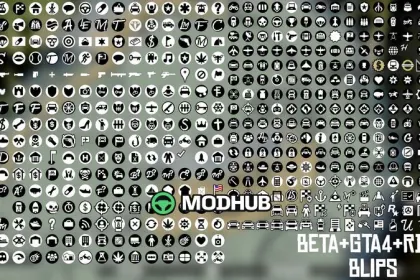
This mod adds map icons to GTA 5 and changes how blips appear on the in-game minimap and map. It replaces the default vanilla markers with icons styled after the beta and GTA4/IV counterparts found in blips.xtd from the xbox360 version.
• Mod type: blips/minimap icon replacement for GTA 5
• Style source: blips.xtd (xbox360) with restored beta and IV variants
• Coverage: all included beta and IV icons are restored; the remaining ones are remade from scratch
• Resource format: ytd-based file meant for modding workflows
• How icons were made: redone using final-version references or original concepts
As a result, your navigation markers look closer to the historical icon sets while keeping the game’s existing functionality intact. On FiveM servers, these updated visuals can make waypoint and location identification feel more consistent and less “generic” compared to the default GTA 5 presentation.
The icons are intended to be free to use, but if you plan to upload the resource for streaming or sharing, it’s recommended to provide proper credit to the people associated with the original icon work and ideas. This package focuses purely on visual mapping markers and does not introduce new gameplay features.
About Beta & GTA4 Map Icons for GTA 5
Beta & GTA4 Map Icons for GTA 5 is a mod for GTA 5. Check the author description, supported game version and dependencies before installing.
How to install the mod
Follow the installation instructions for Beta & GTA4 Map Icons for GTA 5, GTA 5 and your platform.
Download the mod archive using the Download button and read the author instructions.
Use the folder and archive format specified by the mod author for this game.
Start the game and enable the mod for the selected save or profile, if required.
Test using a backup or a new save. Install any dependencies listed by the author.
System requirements and compatibility
Check the mod description for supported game versions, required DLC and platforms. Compatibility with every version or other mods is not guaranteed.
Frequently asked questions
Is this mod free?
MODHUB does not charge for access to this mod page. Check the terms and download limits of the external file provider.
Can I use this mod in GTA 5 multiplayer?
Multiplayer support depends on the mod and its author. If supported, the server and players need matching mod versions and required DLC.
What should I check if the mod does not work?
Check the installation folder, archive structure, supported game version, dependencies and game logs. Test the mod separately using a backup save.
How can I check a downloaded mod?
Use trusted author sources, scan the archive and back up your saves. Do not run unrelated installers; a download listing does not guarantee safety or compatibility.