Fresh GTA 5 Mods: This Month’s Picks
How to keep GTA 5 modding stable (and avoid conflicts)
New mods in GTA 5 are fun instantly, but stability depends on preparation. The most common problems come from version mismatches (especially for model/texture files), outdated dependencies (ScriptHook/ASI plugins, UI helpers), and overlapping changes to the same game systems. Before installing, freeze your current setup: make a backup copy of your mod-related folders, and keep a separate snapshot of files that affect vehicles or the HUD.
A practical workflow is to test one change at a time. For example, if you plan to install both a HUD update and new vehicles, start with the HUD first and run the game for a short session. Then add the car mods. If something breaks, you’ll know exactly which mod caused it.
Vehicles: fresh rides for drives, roleplay, and street chaos
This month’s strongest “feel” comes from vehicles: updated body styles, believable details, and the way each model behaves under acceleration and braking. If your goal is a curated garage, pick based on your gameplay style: premium daily cars, sporty coupes, and big SUV-type machines for cinematic trips.
- Prefer compatible formats. If a mod is labeled Add-on, it’s usually safer alongside existing traffic—just make sure it integrates cleanly into spawn/handling.
- Check spawn behavior. Add-on cars may appear in the garage but not in the world. In that case, look for spawn configuration or additional files included with the mod.
- Avoid physics overlap. If you already use mods that change handling/physics, don’t stack multiple ones that touch the same parameters.
If you want a modern sports vibe, Конвертований BMW M4 G83 для GTA 5 is a great pick. To evaluate it quickly, test in a quiet area or on a fast road: drive a few laps at different speeds and watch steering stability and braking response.
For players who like realistic “daily” driving, Volkswagen Passat Variant для GTA 5 fits the atmosphere well. It’s especially good for longer routes—an estate body often feels less “arcade-like” and more grounded when you’re moving through the city.
Need something bigger for family or mission-style roleplay? Try 2022 BMW X6 Xdrive30d [Add-On] для GTA 5. Add-on releases often keep the vanilla traffic intact. Then test it on hills and during turns: you’ll feel the mass and traction characteristics much faster on varied terrain.
For fans of American full-size SUVs, 2024 Ford Expedition для GTA 5 brings a cinematic “big car” presence. Run a quick comparison in suburbs vs downtown areas and pay attention to suspension behavior over uneven surfaces.
If you want a flashy sports appearance in your screenshots, Додаваний автомобіль 2020 Audi R8 Twin Turbo для GTA 5 is worth installing. For an easy visual check, try night lighting—street lamps and reflections make material quality easier to judge. Also try a winding road to see whether the car remains stable mid-corner.
Vehicles become even more immersive when your game reacts realistically to impacts, so the next mod category matters.
Realism: damage that changes how you drive
Want collisions to feel meaningful instead of cosmetic? Лопата Realistic Damage для GTA 5 is a strong upgrade. Damage mods can change both the visual deformation and the overall “impact feedback,” which directly affects how you handle driving risk. Test it responsibly: don’t start at full speed—try a range of impact speeds and distances, then compare how damage reads on the body.
To prevent disappointment, remember that damage and physics-related mods can conflict with other deformation/handling packages. If you already use anything touching damage behavior, keep only one approach.
HUD: dynamic aim + hitmarker for clearer firefights
Interface tweaks often improve combat pacing more than people expect. HUD VicePoint з динамічним прицілом і хітмаркером для GTA 5 is a good choice if you want a more informative aiming experience. A dynamic reticle helps you stay on target, while the hitmarker makes bullet feedback easier to interpret—especially when default HUD cues feel too subtle.
Do a simple combat test: shoot short bursts at close-to-mid range and see whether you correct your aim faster thanks to hit confirmation. If you also use other HUD modifications, avoid stacking overly bright/contrasting settings that make the screen harder to read.
Characters: Knightfall Batman/Bane for extra cinematic vibes
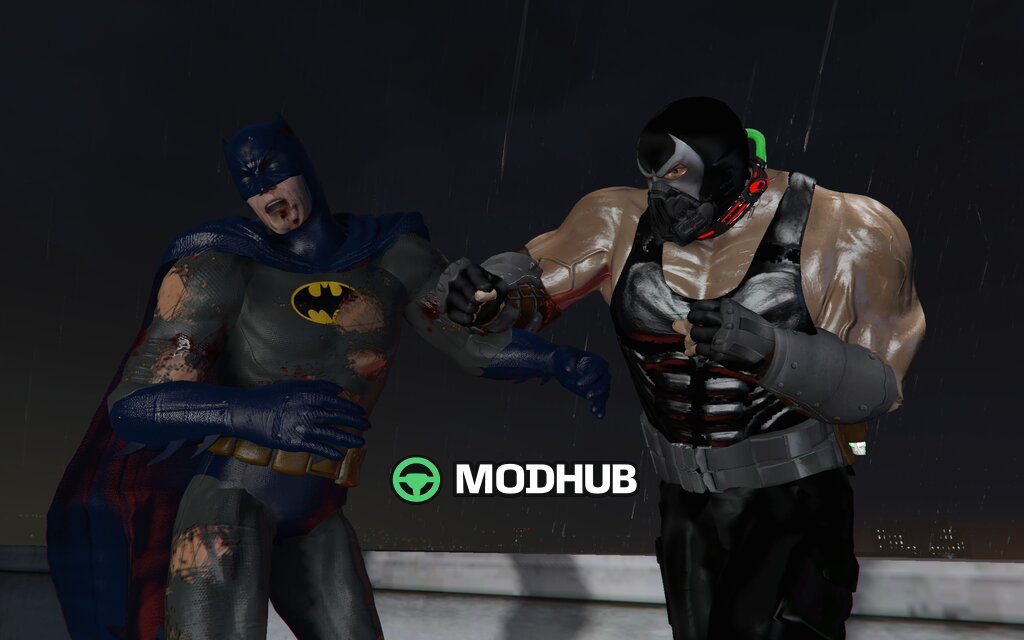
If you want variety beyond cars and UI, consider Персонажі Knightfall Batman/Bane 2 Pack DELUXE для GTA 5. A character pack is perfect for roleplay scenes, custom setups, and “movie-style” screenshots where recognizable silhouettes matter. For best results, combine it with simple scenarios: controlled street encounters, planned camera positions, and scripted-like engagements with specific NPCs.
To avoid surprises, think about where these characters will appear. If they replace standard NPCs, your gameplay balance may shift. If they’re add-on/integrated models, pay attention to the mod’s spawn logic and menu behavior.
A quick, reliable installation plan
1) Disable overlapping systems first (especially damage/physics) so you can isolate issues. 2) Install HUD first, then characters, and only after that add vehicle mods. 3) Test each mod in a short 10–15 minute session. 4) If something fails, check logs/configuration and verify folder structure.
This month’s set covers multiple needs: new vehicle feel (handling and presence), clearer shooting feedback, and cinematic character additions. That balance gives the best overall effect without overloading your setup.