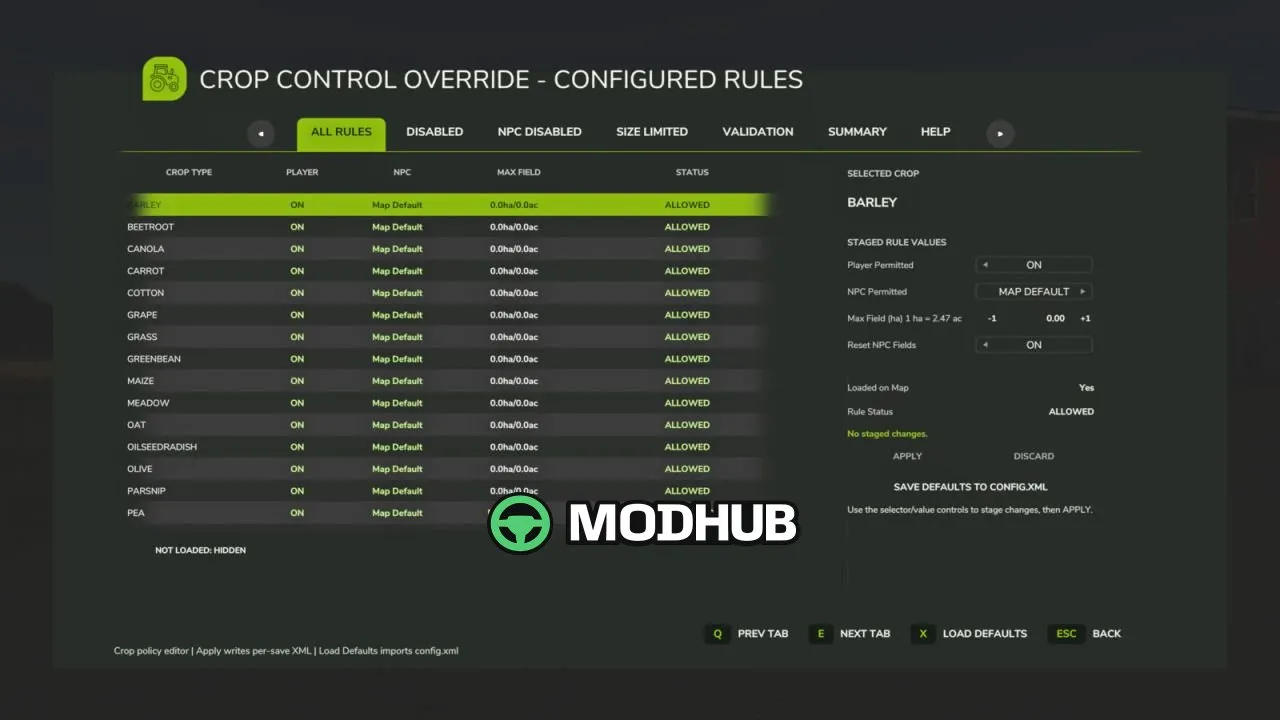
Crop Control Override V2.0.3.6 is a mod for Farming Simulator 25 that acts as a per-save crop policy manager. It lets you decide which crops are permitted for the player, which crops NPC farmers may plant, and whether NPC planting should be restricted by field size. With this setup, your crop rules stay consistent across saves, while NPC behavior and seasonal replacement logic become easier to control.
• Per-save management of allowed crops for player and NPC
• Editable FS25-style GUI to view and edit crop rules
• Per-save XML rule files for configurable policies
• NPC field validation to detect active-policy violations
• Blocked NPC field reporting and validation status summary
• Guarded Apply / Force Apply workflow to prevent accidental invalid save states
• Validation reset modes: CULTIVATED or RESEED SEASONAL
• Reseed weights (0–5) per crop, stored as reseedWeight on each fruit rule
In version V2.0.3.6, seasonalMission and seasonalLifecycle category weights were replaced with an individual 0–5 reseed weight for every crop. A crop weight of 0 excludes it from NPC-field reseeding without disabling it for the player, giving you finer control over how replacement behaves. The mod also keeps the global leaveCultivated weighting so weighted resets can leave some fields cultivated instead of reseeding them. It includes automatic migration for existing per-save XML (default reseedWeight=5 when missing), multiplayer synchronization for per-crop reseed weights, and fixes for dedicated server join issues, remote refreshes, and robustness improvements to NPC crop planning and legacy invalid sow contracts.
About Crop Control Override V2.0.3.6 for FS25
Crop Control Override V2.0.3.6 for FS25 is a mod for Farming Simulator 25. Check the author description, supported game version and dependencies before installing.
How to install the mod
Follow the installation instructions for Crop Control Override V2.0.3.6 for FS25, Farming Simulator 25 and your platform.
Download the mod archive using the Download button and read the author instructions.
On PC, copy the mod ZIP without extracting it to Documents/My Games/FarmingSimulator2025/mods. For a bundle, extract the individual mod ZIPs first. macOS and Microsoft Store paths may differ; check Mod Directory in the game log.txt.
Start the game and enable the mod for the selected save or profile, if required.
Test using a backup or a new save. Install any dependencies listed by the author.
System requirements and compatibility
Check the mod description for supported game versions, required DLC and platforms. Compatibility with every version or other mods is not guaranteed. Farming Simulator script mods are for PC/macOS. Console players can only install compatible mods from the in-game GIANTS ModHub.
Frequently asked questions
Is this mod free?
MODHUB does not charge for access to this mod page. Check the terms and download limits of the external file provider.
Can I use this mod in Farming Simulator 25 multiplayer?
Multiplayer support depends on the mod and its author. If supported, the server and players need matching mod versions and required DLC.
What should I check if the mod does not work?
Check the installation folder, archive structure, supported game version, dependencies and game logs. Test the mod separately using a backup save.
How can I check a downloaded mod?
Use trusted author sources, scan the archive and back up your saves. Do not run unrelated installers; a download listing does not guarantee safety or compatibility.