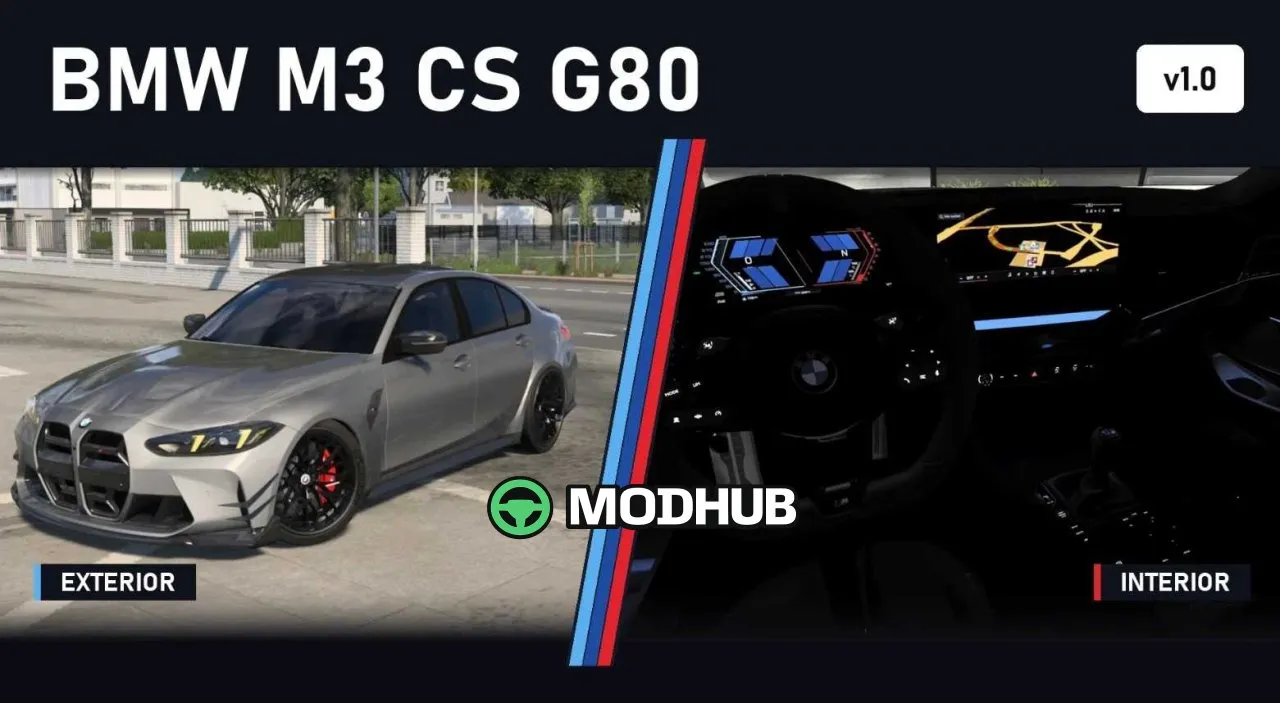
The BMW M3 CS (G80) 1.61x is a sports car for Euro Truck Simulator 2 that adds one of the most powerful versions of the M3 sedan to the game. Under the bonnet sits an S58 3.0-litre twin-turbo engine producing 550 hp (405 kW) and 650 Nm of torque between 2,750 and 5,950 rpm. Power is sent to the rear wheels through a 6-speed automatic gearbox. The car features tuned tyre grip, suspension and steering for a genuine sports car feel.
• Three engine sound variants: normal pops, no pops and loud pops, plus turbo whistle and gear-shift crackle
• 20-inch front and rear M Y-spoke wheels with Michelin Pilot Sport Cup 2 tyres, 275/35 front and 285/30 rear
• LED headlights with yellow CS daytime running lights, animated wipers and openable front windows
• 12 original BMW colours plus custom solid and metallic options, with optional 30 mm lowering
• Configurator for grille, hood stripes, front lip, canards, side gills, side skirts, mirror caps, rear spoiler and diffuser
• Black Merino interior with carbon trim, M steering wheel and ambient lighting in five variants
You can find it in the truck dealers under Access Mod Dealer in the Deppelover Mods category.
About Car BMW M3 CS (G80) 1.61x for ETS2
Car BMW M3 CS (G80) 1.61x for ETS2 is a mod for Euro Truck Simulator 2. Check the author description, supported game version and dependencies before installing.
How to install the mod
Follow the installation instructions for Car BMW M3 CS (G80) 1.61x for ETS2, Euro Truck Simulator 2 and your platform.
Download the mod archive using the Download button and read the author instructions.
Use the folder and archive format specified by the mod author for this game.
Start the game and enable the mod for the selected save or profile, if required.
Test using a backup or a new save. Install any dependencies listed by the author.
System requirements and compatibility
Check the mod description for supported game versions, required DLC and platforms. Compatibility with every version or other mods is not guaranteed.
Frequently asked questions
Is this mod free?
MODHUB does not charge for access to this mod page. Check the terms and download limits of the external file provider.
Can I use this mod in Euro Truck Simulator 2 multiplayer?
Multiplayer support depends on the mod and its author. If supported, the server and players need matching mod versions and required DLC.
What should I check if the mod does not work?
Check the installation folder, archive structure, supported game version, dependencies and game logs. Test the mod separately using a backup save.
How can I check a downloaded mod?
Use trusted author sources, scan the archive and back up your saves. Do not run unrelated installers; a download listing does not guarantee safety or compatibility.