Money in Farming Simulator: How to Boost Your Balance on PC and Consoles (FS19, FS22, FS25)
Tired of slow farm development? Dreaming of top-notch combines, new fields, and the most powerful tractors, but only have pennies in your account?
Farming Simulator is a game about patience, but sometimes you just want to have fun and test all the equipment without hours of grinding. Fortunately, you can add a few million to your account in just a few minutes.
In this article, we will explore two proven methods: file editing (for PC) and using special mods (for PlayStation and Xbox).
Method 1: For PC Players (Windows / Mac)
The fastest method without downloading additional programs.
If you are playing on a computer (Steam, Epic Games, or GIANTS version), you have full access to the save files. This allows you to manually change the balance. This method works for FS19, FS22, and FS25.
Step-by-step guide:
-
Find the save folder.
Go toDocuments→My Games→FarmingSimulator20xx(replace XX with your game version). -
Select the desired slot.
Open the foldersavegame1(if your save is in the first slot),savegame2, etc. -
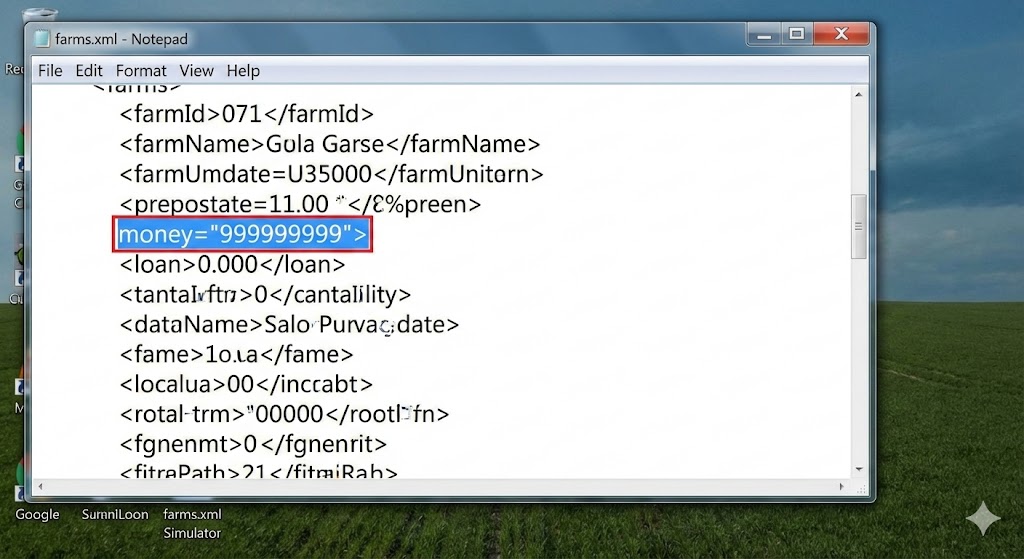
Find the file farms.xml.
Right-click on this file and select "Open with" → Notepad. -
Change the amount of money.
- Press the key combination
Ctrl + Fto open the search. - Type the word
moneyand press Enter. - You will find a line like:
money="10000.000000". - Replace the number in quotes with any desired amount (for example,
money="50000000").
- Press the key combination
-
Save the result.
PressCtrl + S, close the file, and launch the game.
💡 Tip: Before editing, copy the file
farms.xmlto your desktop. If something goes wrong, you can easily revert to the original file.
Method 2: For Consoles (PS4, PS5, Xbox One, Series X/S)
Using the official mod "Government Subsidy".
On consoles, there is no access to the file system, so editing the code is not possible. However, mod developers have created a legal way to obtain funds — through the in-game mechanics of "government subsidies".
Step-by-step guide:
-
Install the mod.
In the main menu of the game, go to the "Downloadable Content" (Downloadable Content / Mods) section. In the search, type: Government Subsidy. Download and install this mod. When launching your save, make sure to check the box next to it. -
Activate income.
Enter the game and open the Store. Go to the Decorations section or Construction → Production → Generators. Look for signs labeled "Government Subsidy". -
Get rich.
Place one or more signs on your plot. Each sign generates huge income (for example, $100,000 or $1,000,000) every hour of game time.
Speed up the time in the game to the maximum (120x or more) and watch your balance grow. Once you accumulate the desired amount, simply sell the signs.
❓ Frequently Asked Questions (FAQ)
1. I changed the numbers in the farms.xml file, but the money did not appear in the game. What went wrong?
The most common mistake is editing the file while the game is running. First, completely exit Farming Simulator, save the changes in Notepad, and then restart the game.
2. Will I get banned for boosting money?
No. Farming Simulator is not a competitive online game. The developers are lenient towards modifications since it is a "sandbox".
3. Does the "Government Subsidy" mod block achievements on consoles?
No, using mods in Farming Simulator does not block trophy acquisition on PlayStation or Xbox.
4. I installed the mod but can't find the sign in the store.
Look for it in this path: Construction Menu → Production → Generators. Or in the Decorations tab.
Conclusion
Now you know how to bypass financial limitations in Farming Simulator. Whether you want to build an empire through honest work or just want to test the most expensive equipment without limits — the choice is yours.
Happy farming and great harvests!